
30. Fonts
In this part, new fonts are added into the game.
本节要为游戏加入新的字体。
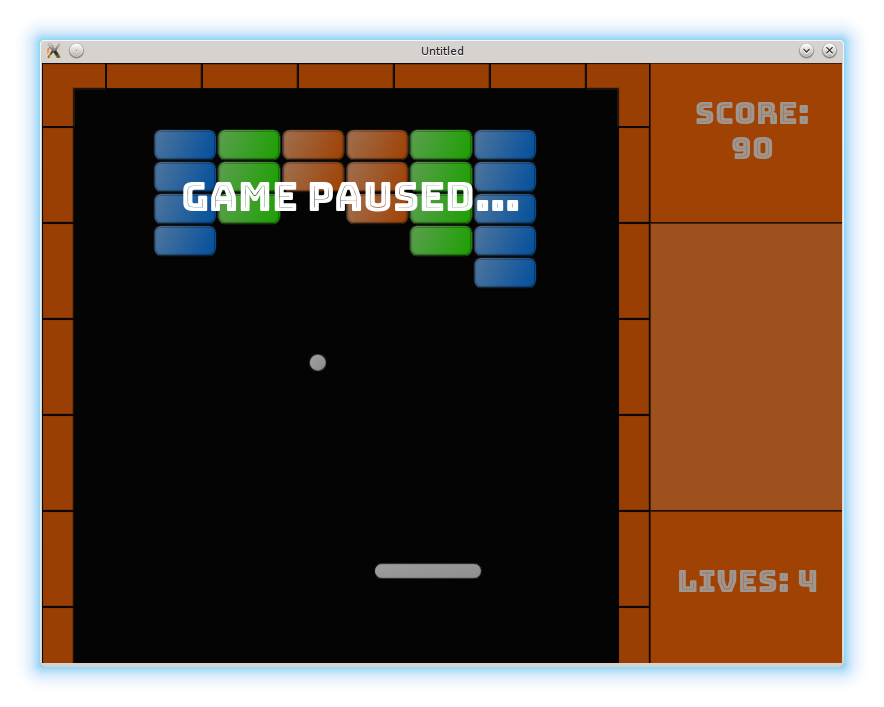
LÖVE's single embedded font is good for prototyping, but may not fit nicely with other art. This can be fixed by using custom fonts. There are two ways to specify them: by a font *.ttx file, or by an image.
LÖVE 自带的单一字体适合做原型,但未必能和其它美术风格匹配。可以通过自定义字体解决。字体有两种指定方式:使用字体 *.ttx 文件,或使用图片。
A good place to start looking for fonts is Google fonts. Apart from that, a decent collection of videogames-oriented fonts can be found on OpenGameArt. Be sure to check license agreement for the font of your choice. In the current case, I've thought that Bungee Inline is a good fit. After downloading an archive with the *.ttx file, I've placed it into the fonts/Bungee_Inline folder.
找字体的一个好起点是 Google fonts。另外在 OpenGameArt 也能找到不少面向游戏的字体。务必查看你选择的字体授权协议。在这里我觉得 Bungee Inline 很合适。下载 *.ttx 文件的压缩包后,我把它放在 fonts/Bungee_Inline 文件夹里。
There are several places where the new font should be used: lives and score displays, "game paused" and "game finished" screens. Let's start from score_display.
新字体需要用在几个地方:生命与得分显示、“game paused” 和 “game finished” 界面。我们先从 score_display 开始。
To use a font, first it is necessary to load it. After that, in the drawing function it is necessary to save the old font, set the new one, print something, and restore the old font.
使用字体时,先加载字体;在绘制函数中保存旧字体、设置新字体、打印文本,然后恢复旧字体。
local score_display = {}
.....
local separation = 35                              --(*1)

local bungee_font = love.graphics.newFont(
   "/fonts/Bungee_Inline/BungeeInline-Regular.ttf", 30 )

function score_display.draw()
   local oldfont = love.graphics.getFont()
   love.graphics.setFont( bungee_font )
   local r, g, b, a = love.graphics.getColor()
   love.graphics.setColor( 255, 255, 255, 230 )
   love.graphics.printf( "Score:",                 --(*2)
                         position.x,
                         position.y,
                         width,
                         "center" )
   love.graphics.printf( score_display.score,
                         position.x,
                         position.y + separation,
                         width,
                         "center" )
   love.graphics.setFont( oldfont )
   love.graphics.setColor( r, g, b, a )
end
(*1): Score is displayed in two lines. Vertical separation between them is specified by separation variable.
(*2): I use love.graphics.printf instead of love.graphics.print to position the text.
(*1):得分分两行显示,行间距由 separation 指定。
(*2):我用 love.graphics.printf 代替 love.graphics.print 来控制文本对齐。
For lives_display changes are similar.
lives_display 的修改方式类似。
local bungee_font = love.graphics.newFont(
   "/fonts/Bungee_Inline/BungeeInline-Regular.ttf", 30 )

function lives_display.draw()
   local oldfont = love.graphics.getFont()
   love.graphics.setFont( bungee_font )
   local r, g, b, a = love.graphics.getColor( )
   love.graphics.setColor( 255, 255, 255, 230 )
   love.graphics.printf( "Lives: " .. tostring( lives_display.lives ),
                         position.x,
                         position.y,
                         width,
                         "center" )
   love.graphics.setFont( oldfont )
   love.graphics.setColor( r, g, b, a )
end
In the "game paused" screen, the text is centered. Besides, cast_shadow function is added which provides darkening effect by drawing half-transparent black rectangle on top of the game objects.
在 “game paused” 界面中,文字居中显示。另外新增 cast_shadow 函数,通过绘制半透明黑色矩形,让画面变暗。
bungee_font = love.graphics.newFont(
   "/fonts/Bungee_Inline/BungeeInline-Regular.ttf", 40 )

function gamepaused.draw()
   for _, obj in pairs( game_objects ) do
      if type(obj) == "table" and obj.draw then
         obj.draw()
      end
   end
   gamepaused.cast_shadow()

   local oldfont = love.graphics.getFont()
   love.graphics.setFont( bungee_font )
   love.graphics.printf( "Game Paused...",
                         108, 110, 400, "center" )
   love.graphics.setFont( oldfont )
end

function gamepaused.cast_shadow()
   local r, g, b, a = love.graphics.getColor( )
   love.graphics.setColor( 10, 10, 10, 100 )
   love.graphics.rectangle("fill",
                           0,
                           0,
                           love.graphics.getWidth(),
                           love.graphics.getHeight() )
   love.graphics.setColor( r, g, b, a )
end
Finally, "gamefinished" screen is also updated.
最后,“gamefinished” 界面也要更新。
bungee_font = love.graphics.newFont(
   "/fonts/Bungee_Inline/BungeeInline-Regular.ttf", 30 )

function gamefinished.draw()
   local oldfont = love.graphics.getFont()
   love.graphics.setFont( bungee_font )
   love.graphics.printf( "Congratulations!",
                         235, 200, 350, "center" )
   love.graphics.printf( "You have finished the game!",
                         100, 240, 600, "center" )
   love.graphics.setFont( oldfont )
end