
06. Levels
The next step is to implement different levels.
下一步是实现不同的关卡。
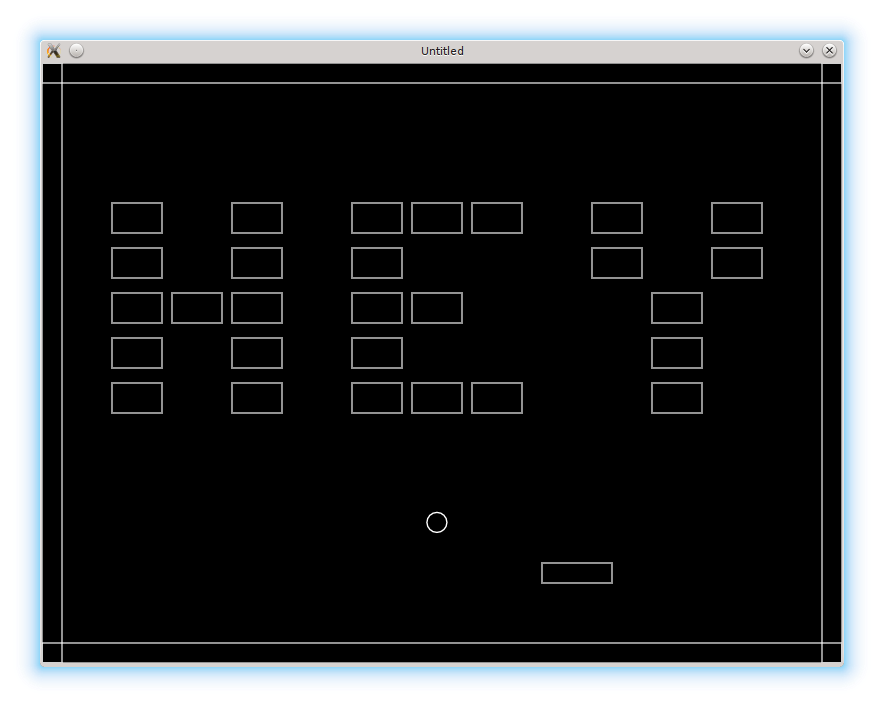
All levels-related information will be held at the levels table. The actual sequence of levels will be stored in the levels.sequence array.
所有与关卡相关的信息都放在 levels 表里。关卡的实际顺序放在 levels.sequence 数组中。
local levels = {}
.....
levels.sequence = {}
I represent each level as a 2d-table. Inner tables correspond to the rows of the bricks. In the future, the numbers will indicate the brick types; currently they only show whether the brick is present on certain position or not.
我用一个二维表来表示每一关。内层表对应砖块的行。以后这些数字会用来表示砖块类型;现在它们只表示该位置是否有砖块。
levels.sequence[1] = {
   { 0, 0, 0, 0, 0, 0, 0, 0, 0, 0, 0 },
   { 0, 0, 0, 0, 0, 0, 0, 0, 0, 0, 0 },
   { 1, 0, 1, 0, 1, 1, 1, 0, 1, 0, 1 },
   { 1, 0, 1, 0, 1, 0, 0, 0, 1, 0, 1 },
   { 1, 1, 1, 0, 1, 1, 0, 0, 0, 1, 0 },
   { 1, 0, 1, 0, 1, 0, 0, 0, 0, 1, 0 },
   { 1, 0, 1, 0, 1, 1, 1, 0, 0, 1, 0 },
   { 0, 0, 0, 0, 0, 0, 0, 0, 0, 0, 0 },
}

levels.sequence[2] = {
   { 0, 0, 0, 0, 0, 0, 0, 0, 0, 0, 0 },
   { 0, 0, 0, 0, 0, 0, 0, 0, 0, 0, 0 },
   { 1, 1, 0, 0, 1, 0, 1, 0, 1, 1, 1 },
   { 1, 0, 1, 0, 1, 0, 1, 0, 1, 0, 0 },
   { 1, 1, 1, 0, 0, 1, 0, 0, 1, 1, 0 },
   { 1, 0, 1, 0, 0, 1, 0, 0, 1, 0, 0 },
   { 1, 1, 1, 0, 0, 1, 0, 0, 1, 1, 1 },
   { 0, 0, 0, 0, 0, 0, 0, 0, 0, 0, 0 },
}
Since there are several levels, it is necessary to maintain the current level number:
既然有多关,就需要维护当前关卡号:
levels.current_level = 1Changes are necessary in bricks.construct_level function, to make it receive one of the levels.sequence[.....] tables with bricks arrangement.
需要改一下 bricks.construct_level,让它接收 levels.sequence[.....] 中的某个砖块排列表。
function bricks.construct_level( level_bricks_arrangement )
   bricks.no_more_bricks = false
   for row_index, row in ipairs( level_bricks_arrangement ) do         --(*1)
      for col_index, bricktype in ipairs( row ) do
         if bricktype ~= 0 then                                        --(*2)
            local new_brick_position_x = bricks.top_left_position_x +
               ( col_index - 1 ) *
               ( bricks.brick_width + bricks.horizontal_distance )
            local new_brick_position_y = bricks.top_left_position_y +
               ( row_index - 1 ) *
               ( bricks.brick_height + bricks.vertical_distance )
            local new_brick = bricks.new_brick( new_brick_position_x,
                                                new_brick_position_y )
            table.insert( bricks.current_level_bricks, new_brick )
         end
      end
   end
end
(*1): Instead of the fixed number of rows and columns, the iteration goes over the elements of the level_bricks_arrangement.
(*2): The brick is created if it's type is nonzero.
(*1):不再用固定行列数,而是遍历 level_bricks_arrangement 的元素。
(*2):只有当砖块类型不是 0 时才创建砖块。
When there are no more bricks left, switch to the next level happens. The number of remaining bricks is monitored by bricks.update function. If there are none, a function to switch to the next level could be called. However, instead of that, I raise the bricks.no_more_bricks flag, which is checked each update cycle
当砖块全部被打完时,就该切换到下一关。剩余砖块数由 bricks.update 监控。如果已经没有砖块了,本可以直接调用切关函数,但我选择设置一个 bricks.no_more_bricks 标志,并在每次更新时检查它。
function bricks.update( dt )
   if #bricks.current_level_bricks == 0 then    --(*1)
      bricks.no_more_bricks = true
   else
      for _, brick in pairs( bricks.current_level_bricks ) do
         bricks.update_brick( brick )
      end
   end
end

function love.update( dt )
   .....
   levels.switch_to_next_level( bricks )
end
(*1): The number of remaining bricks is equivalent to the length of the bricks.current_level_bricks table.
(*1):剩余砖块数等于 bricks.current_level_bricks 表的长度。
If it is on, then the current_level is updated, the new set of bricks is constructed and the ball is repositioned.
如果这个标志为真,就更新 current_level,构建新的砖块集合,并重置球的位置。
function levels.switch_to_next_level( bricks )
   if bricks.no_more_bricks then
      .....
         levels.current_level = levels.current_level + 1
         bricks.construct_level( levels.sequence[levels.current_level] )
         ball.reposition()
      .....
      end
   end
end

function ball.reposition()
   ball.position_x = 200
   ball.position_y = 500
end
It is possible to directly call the levels.switch_to_next_level in the bricks.update instead of rising the bricks.no_more_bricks flag. However, the flag will be more convenient later, when gamestates are introduced.
你也可以在 bricks.update 中直接调用 levels.switch_to_next_level,而不是设置 bricks.no_more_bricks 标志。但后面引入游戏状态(gamestates)时,这个标志会更方便。
It is also necessary to do something special when there are no more levels, i.e. when the game is finished. For now, displaying a simple congratulations message should be sufficient.
当关卡全部通关时,也需要做点特别处理。现在先简单显示一条祝贺信息就够了。
The total number of levels equals to the length of the levels.sequence array. It is possible to check whether the levels.current_level is the last one by comparing it with the #levels.sequence. When there are no more levels left, switch_to_next_level function raises the levels.gamefinished flag.
关卡总数等于 levels.sequence 数组的长度。把 levels.current_level 和 #levels.sequence 比较,就能判断是否已经到最后一关。当没有更多关卡时,switch_to_next_level 会设置 levels.gamefinished 标志。
function levels.switch_to_next_level( bricks )
   if bricks.no_more_bricks then
      if levels.current_level < #levels.sequence then       --(*1)
         levels.current_level = levels.current_level + 1                  --(*2)
         bricks.construct_level( levels.sequence[levels.current_level] )
         ball.reposition()
      else
         levels.gamefinished = true                                       --(*3)
      end
   end
end
(*1): checks, whether the levels.current_level is the last one.
(*2): if not, update the level counter, construct new level and reposition the ball.
(*3): otherwise signal that the game is finished.
(*1):检查 levels.current_level 是否为最后一关。
(*2):如果不是,更新关卡编号,构建新关卡并重置球的位置。
(*3):否则标记游戏结束。
When levels.gamefinished is on, the message is displayed
当 levels.gamefinished 为 true 时显示提示信息:
function love.draw()
   .....
   walls.draw()
   if levels.gamefinished then
      love.graphics.printf( "Congratulations!\n" ..
			       "You have finished the game!",
			    300, 250, 200, "center" )
   end
end
Through this tutorial I've chosen to represent levels as 2d Lua tables. In the appendix A a method to store them as text strings is demonstrated.
在本教程中,我选择用二维 Lua 表来表示关卡。在附录 A 里会演示如何用文本字符串来存储关卡。