
28. Side Panel
This part is devoted to the panel on the right side of the game screen.
本节介绍游戏画面右侧的侧边面板。
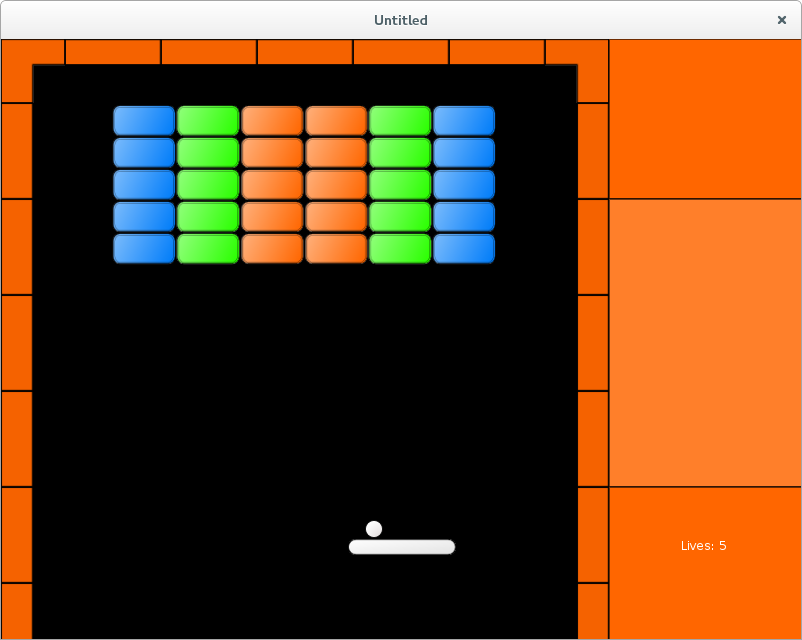
It is enough to define a simple function to draw a fancy background image at some part of the screen. Instead, I make the side panel a full-fledged game object with it's own draw and update methods. An advantage of such an approach is that it allows to easily pass the side panel between the gamestates.
其实只要写个简单函数,在屏幕右侧画一张背景图就行。但我把侧边面板做成一个完整的游戏对象,拥有自己的 draw 和 update。这样做的好处是可以很方便地在不同 gamestate 之间传递它。
While it is possible to use an image as a background, I just draw three rectangular segments of uniform color (top, middle, and bottom). This can be implemented using love.graphics primitives.
背景当然可以用图片,但我只是画了三块纯色矩形(上、中、下)。这可以直接用 love.graphics 原语实现。
local side_panel = {}
local position_x = 608
local width = 200
local height_top = 160
local height_middle = 288
local height_bottom = 160
local position_top = vector( position_x, 0 )
local position_middle = vector( position_x, height_top )
local position_bottom = vector( position_x, height_top + height_middle )

function side_panel.draw()
   side_panel.draw_background()
   .....
end

function side_panel.draw_background()
   local drawtype = 'fill'
   local r, g, b, a = love.graphics.getColor( )
   -- top
   love.graphics.setColor( 255, 102, 0, 255 )
   love.graphics.rectangle("fill",
                           position_top.x,
                           position_top.y,
                           width,
                           height_top )
   love.graphics.setColor( 0, 0, 0, 255 )
   love.graphics.rectangle("line",
                           position_top.x,
                           position_top.y,
                           width,
                           height_top )
   -- middle
   love.graphics.setColor( 255, 127, 42, 255 )
   love.graphics.rectangle("fill",
                           position_middle.x,
                           position_middle.y,
                           width,
                           height_middle )
   love.graphics.setColor( 0, 0, 0, 255 )
   love.graphics.rectangle("line",
                           position_middle.x,
                           position_middle.y,
                           width,
                           height_middle )
   -- bottom
   love.graphics.setColor( 255, 102, 0, 255 )
   love.graphics.rectangle("fill",
                           position_bottom.x,
                           position_bottom.y,
                           width,
                           height_bottom )
   love.graphics.setColor( 0, 0, 0, 255 )
   love.graphics.rectangle("line",
                           position_bottom.x,
                           position_bottom.y,
                           width,
                           height_bottom )
   love.graphics.setColor( r, g, b, a )
end
Another use for the side_panel object is that it serves as a container for lives_display. While it slightly reduces a number of variables in the "game" gamestate, the main advantage of such approach is that it allows to achieve a fixed drawing order for elements on the side panel: background at the bottom and lives_display at the top. This is controlled by the side_panel.draw function.
side_panel 的另一个作用是作为 lives_display 的容器。虽然这样做只是稍微减少了 “game” 状态里的变量数量,但主要优势在于可以固定侧边面板的绘制顺序:背景在底层,lives_display 在上层。这个顺序由 side_panel.draw 控制。
local lives_display = require "lives_display"

side_panel.lives_display = lives_display

function side_panel.update( dt )
   side_panel.lives_display.update( dt )
end

function side_panel.draw()                      --(*1)
   side_panel.draw_background()
   side_panel.lives_display.draw()
end
(*1): The drawing order is controlled by side_panel.draw function. The background is drawn first, and lives_display on top of it.
(*1):side_panel.draw 控制绘制顺序:先画背景,再画 lives_display。
Such rearrangement requires certain updates in the "game" game state.
这种调整需要在 “game” 状态里做一些修改。
.....
local side_panel = require "side_panel"
.....


function game.enter( prev_state, ... )
   .....
   if prev_state == "gameover" or prev_state == "gamefinished" then
      side_panel.lives_display.reset()
      music:rewind()
   end
   .....
end


function game.update( dt )
   .....
   walls.update( dt )
   side_panel.update( dt )
   collisions.resolve_collisions( balls, platform,
                                  walls, bricks,
                                  bonuses, side_panel.lives_display )
   game.check_no_more_balls( balls, side_panel.lives_display )
   .....
end

function game.draw()
   balls.draw()
   .....
   side_panel.draw()
end

function game.keyreleased( key, code )
   .....
   elseif  key == 'escape' then
      music:pause()
      gamestates.set_state(
         "gamepaused",
         { balls, platform, bricks, bonuses, walls, side_panel } )
   end
end

function game.mousereleased( x, y, button, istouch )
   .....
   elseif button == 'r' or button == 2 then
      music:pause()
      gamestates.set_state(
         "gamepaused",
         { balls, platform, bricks, bonuses, walls, side_panel } )
   end
end

function game.check_no_more_balls( balls, lives_display )
   if balls.no_more_balls then
      .....
      if lives_display.lives < 0 then
         gamestates.set_state( "gameover",
                               { balls, platform, bricks,
                                 bonuses, walls, side_panel } )
      else
      .....
   end
end