
29. Score
In this part, score counter is implemented.
本节实现计分系统。
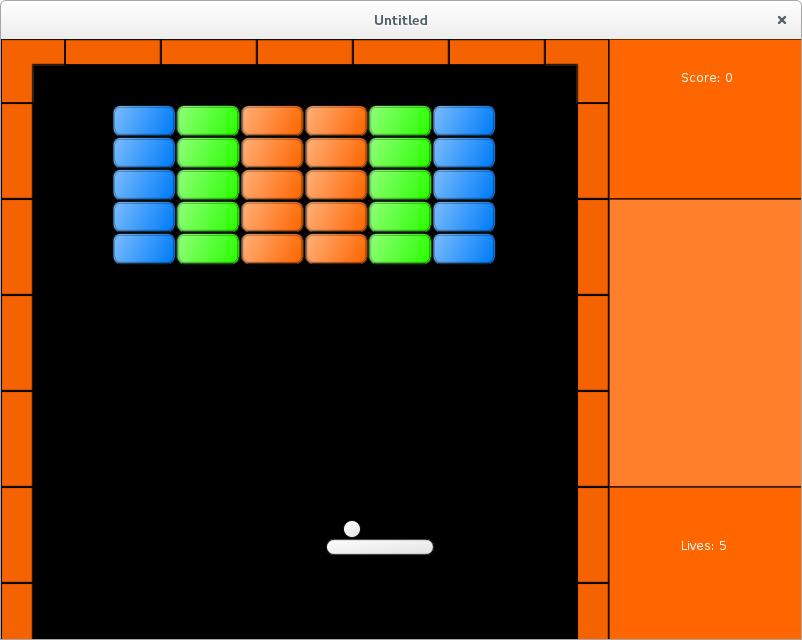
Score is increased on each successful action of the player. This adds another element of interactivity into the game and contributes a bit to player's involvement. To make it more meaningful, lives are added when certain milestones are reached.
玩家每次成功操作都会增加分数。这为游戏增加了交互感,也让玩家更有参与感。为了让分数更有意义,当达到某些里程碑时会奖励额外生命。
From implementation standpoint, score display is similar to lives display, which can be used as a starting point for this object.
实现上,分数显示与生命显示类似,可以直接作为起点。
local vector = require "vector"

local score_display = {}
score_display.position = vector( 680, 32 )
score_display.score = 0

function score_display.update( dt )
end

function score_display.draw()
   love.graphics.print( "Score: " .. tostring( score_display.score ),
                        score_display.position.x,
                        score_display.position.y )
end

function score_display.reset()
   score_display.score = 0
end
Score is updated each time a brick breaks. 10 points are added for simple brick and 30 for armored.
每次砖块被击碎都会加分。简单砖块加 10 分,装甲砖加 30 分。
function score_display.add_score_for_simple_brick()
   score_display.score = score_display.score + 10
end

function score_display.add_score_for_cracked_brick()
   score_display.score = score_display.score + 30
end
In the current code structure, bricks.brick_hit_by_ball function determines whether or not a brick breaks after collision with a ball. The score-increasing functions also have to be called from there.
在当前结构里,bricks.brick_hit_by_ball 决定砖块是否在碰撞后被击碎,因此加分函数也应在这里调用。
function bricks.brick_hit_by_ball( i, brick, shift_ball, bonuses, score_display )
   if bricks.is_simple( brick ) then
      .....
      score_display.add_score_for_simple_brick()
      table.remove( bricks.current_level_bricks, i )
      simple_break_sound:play()
   elseif .....
   elseif bricks.is_cracked( brick ) then
      .....
      score_display.add_score_for_cracked_brick()
      table.remove( bricks.current_level_bricks, i )
      armored_break_sound:play()
   elseif bricks.is_heavyarmored( brick ) then
      ball_heavyarmored_sound:play()
   end
end
Just like the lives_display, the score_counter is placed inside the side_panel object.
和 lives_display 一样,score_display 也放进 side_panel 对象中。
local lives_display = require "lives_display"
local score_display = require "score_display"

side_panel.lives_display = lives_display
side_panel.score_display = score_display

function side_panel.update( dt )
   side_panel.lives_display.update( dt )
   side_panel.score_display.update( dt )
end

function side_panel.draw()
   side_panel.draw_background()
   side_panel.lives_display.draw()
   side_panel.score_display.draw()
end

function side_panel.reset()
   side_panel.lives_display.reset()
   side_panel.score_display.reset()
end
Care should be taken regarding passing of the side_panel.score_display and side_panel.lives_display into collision-resolving functions.
需要注意把 side_panel.score_display 和 side_panel.lives_display 传给碰撞处理函数。
function collisions.resolve_collisions( balls, platform, walls, bricks, bonuses,
                                        side_panel )
   .....
   collisions.balls_bricks_collision( balls, bricks, bonuses,
                                      side_panel.score_display )
   .....
   collisions.platform_bonuses_collision( platform, bonuses, balls, walls,
                                          side_panel.lives_display )
end
Certain minor modifications to the "game", such as replacement of side_panel.lives_display.reset by side_panel.reset are also necessary.
“game” 中也需要一些小修改,例如把 side_panel.lives_display.reset 改成 side_panel.reset。
function game.enter( prev_state, ... )
   .....
   if prev_state == "gameover" or prev_state == "gamefinished" then
      side_panel.reset()
      music:rewind()
   end
   .....
end
To add life on score milestone, it is necessary to compare the current score with the next milestone. While I place a function inside game.update performing such comparison each update cycle, it is probably more efficient to do it immediately after each score change.
要在达到分数里程碑时加命,需要把当前分数与下一里程碑进行比较。我把这个检查放在 game.update 里每帧执行,但更高效的做法其实是每次分数变化后就检查一次。
function game.update( dt )
   .....
   side_panel.lives_display.add_life_if_score_reached(
      side_panel.score_display.score )
   game.check_no_more_balls( balls, side_panel.lives_display )
   .....
end
The milestone should be increased each time the previous value is reached. For this reason, it is necessary to keep it's state somehow. I maintain lives_display.lives_added_from_score counter and the next milestone is computed as (lives_display.lives_added_from_score + 1) * 3000, i.e. life is added each 3000 points.
里程碑在每次达到后都要向上推进,因此需要记录当前状态。我用 lives_display.lives_added_from_score 来计数,下一里程碑计算为 (lives_display.lives_added_from_score + 1) * 3000,也就是说每 3000 分加一条命。
.....
lives_display.lives_added_from_score = 0

function lives_display.add_life_if_score_reached( score )
   local score_milestone = (lives_display.lives_added_from_score + 1) * 3000
   if score >= score_milestone then
      lives_display.add_life()
      lives_display.lives_added_from_score = lives_display.lives_added_from_score + 1
   end
end

function lives_display.reset()
   lives_display.lives = 5
   lives_display.lives_added_from_score = 0
end