
18. Ball Launch From Platform
Traditionally, in arkanoid a level is started with the ball glued to the platform. When the player presses a key, the ball is launched. In this part, I want to implement such a behavior.
传统的 Arkanoid 里,关卡开始时球是粘在平台上的。玩家按下按键后球才会发射。本节就来实现这种行为。
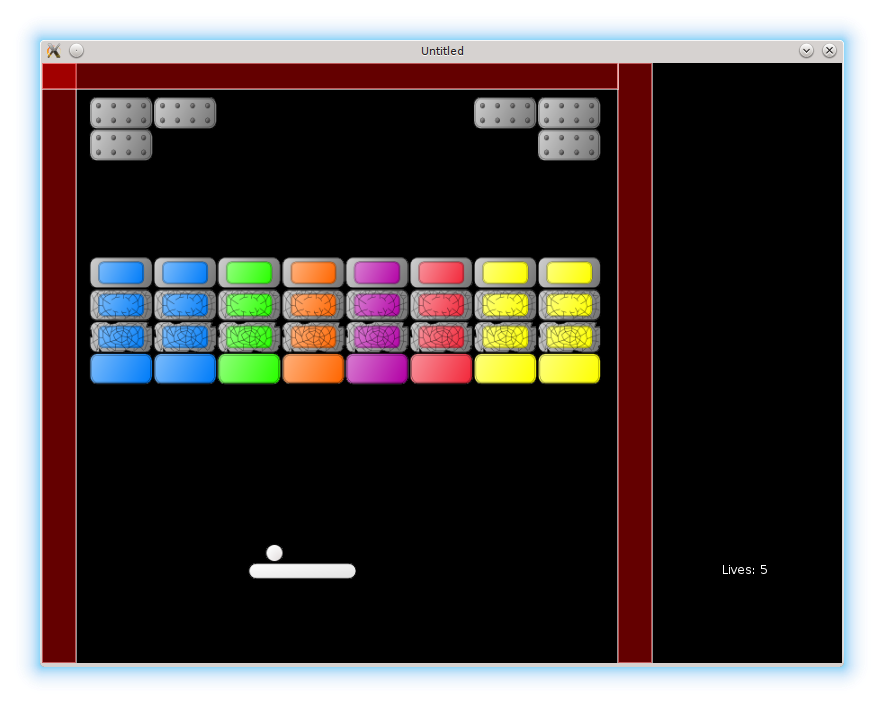
At first sight, to glue the ball to the platform, it is possible to set it's velocity to zero and make it react on arrow keys similarly to the platform (i.e. move left or right with the same speed as the platform). With such an approach, when the platform with the glued ball is pressed against the wall, the ball slides over the platform. There is nothing wrong with it, but I want a traditional mechanics, where the ball doesn't move over the platform. To implement it, a different strategy is required. For example, it is possible to fix a distance between the centers of the ball and the platform and when the platform moves, update the ball position relatively to the platform. This requires to store a stuck_to_platform flag and a separation_from_platform_center vector in the ball table. Since a level is started with the ball glued to the platform, default value for the ball.stuck_to_platform is true. Also, it is necessary to provide some initial ball-platform displacement.
乍一看,把球粘在平台上似乎只要把速度设为 0,并让球像平台一样响应方向键(即以相同速度左右移动)就行了。但这样做会有一个问题:当带着球的平台贴墙移动时,球会在平台上滑动。虽然这并非错误,但我希望实现传统机制——球不会在平台上滑动。为此需要不同的策略,比如固定球心和平台中心之间的相对位移,当平台移动时,让球相对平台更新位置。实现这个需要在 ball 表里保存 stuck_to_platform 标志和 separation_from_platform_center 向量。由于关卡开始时球是粘在平台上的,所以 ball.stuck_to_platform 默认值为 true。此外,还需要给出一个初始的球-平台偏移量。
local ball_x_shift = -28
local platform_height = 16
local platform_starting_pos = vector( 300, 500 )              --(*1)
ball.stuck_to_platform = true
ball.separation_from_platform_center = vector(
   ball_x_shift, -1 * platform_height / 2 - ball.radius - 1 )
ball.position = platform_starting_pos + ball.separation_from_platform_center  --(*1)
(*1): In fact, there is no need to worry about the initial platform coordinates, since the ball will be positioned relative to the platform center automatically on the first call to the update method.
(*1):实际上不需要太在意平台初始坐标,因为第一次调用 update 时,球会自动根据平台中心重新定位。
In the ball.update it is necessary to insert a check for the stuck_to_platform flag. If it is on, the ball should be positioned relatively to the platform. This requires to pass the platform coordinates into the ball.update. I pass the the whole platform object instead of coordinates only, because other platform properties will be necessary in the future.
在 ball.update 中需要检查 stuck_to_platform 标志。如果为真,就要把球定位到平台的相对位置。这要求把平台坐标传进 ball.update。我直接传整个平台对象,而不是单纯坐标,因为后续可能还需要平台的其它属性。
function ball.update( dt, platform )
   ball.position = ball.position + ball.speed * dt
   if ball.stuck_to_platform then
      ball.follow_platform( platform )
   end
   ball.check_escape_from_screen()
end

function ball.follow_platform( platform )
   local platform_center = vector(
      platform.position.x + platform.width / 2,
      platform.position.y + platform.height / 2 )
   ball.position = platform_center + ball.separation_from_platform_center
end

function game.update( dt )
   ball.update( dt, platform )
   platform.update( dt )
   .....
end
Finally, the ball has to be launched on a key press. An appropriate function in the game.keyreleased callback drops the stuck_to_platform flag and sets nonzero velocity to the ball (some initial velocity has to be stored in the ball table).
最后,需要在按键时发射球。game.keyreleased 里写一个函数:清除 stuck_to_platform 标志并给球一个非零速度(初始速度需要提前存进 ball 表)。
.....
local first_launch_speed = vector( -150, -300 )
ball.speed = vector( 0, 0 )
ball.image = love.graphics.newImage( "img/800x600/ball.png" )
.....

function ball.launch_from_platform()
   if ball.stuck_to_platform then
      ball.stuck_to_platform = false
      ball.speed = first_launch_speed:clone()
   end
end

function game.keyreleased( key, code )
   .....
   elseif key == 'space' or key == ' ' then   --(*1)
      ball.launch_from_platform()
   elseif .....
end
(*1): Space key is represented as 'space' in love-0.10 and as ' ' in love-0.9.
(*1):在 love-0.10 中空格键是 'space',在 love-0.9 中则是 ' '。
When the ball is lost, it is necessary to reposition it on the platform. The ball position relative to the platform will be set automatically during the first call to the ball.update.
当球丢失时,需要把它重新放回平台上。球相对平台的位置会在第一次 ball.update 调用时自动设置。
function ball.reposition()
   ball.escaped_screen = false
   ball.collision_counter = 0
   ball.stuck_to_platform = true
   ball.speed = vector( 0, 0 )
end