
16. Game Over
So far, one important component has been missing - the game over condition.
到目前为止,有一个重要组件一直缺失——游戏结束条件。
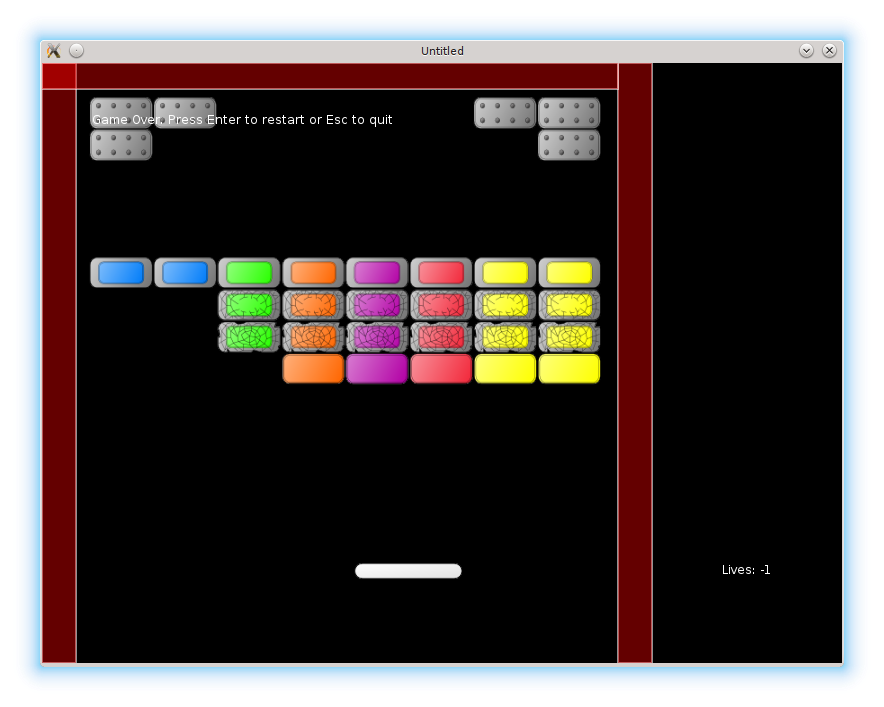
The mechanics is simple: it is necessary to add a lives counter and remove one life if the ball escapes through the bottom border of the screen. If the amount of lives becomes less than zero, the game over screen is shown.
机制很简单:加入一个生命计数器,当球从屏幕底部飞出时扣掉一条命。如果生命数量变成小于 0,就显示游戏结束画面。
I define a separate table lives_display, similar to the ball and the platform. The lives are stored in the lives field; on start there are 5 of them.
我定义一个单独的表 lives_display,与 ball 和 platform 类似。生命数保存在 lives 字段里,初始为 5。
local lives_display = {}
lives_display.lives = 5
The update function is empty, draw displays the remaining lives in the bottom-right corner of the screen defined by lives_display.position = vector( 680, 500 ).
update 函数为空,draw 会在屏幕右下角显示剩余生命数,位置由 lives_display.position = vector( 680, 500 ) 定义。
function lives_display.update( dt )
end

function lives_display.draw()
   love.graphics.print( "Lives: " .. tostring( lives_display.lives ),
                        lives_display.position.x,
                        lives_display.position.y )
end
The lives_display has to be required from the game.lua:
lives_display 需要在 game.lua 中 require 进来:
.....
local walls = require "walls"
local lives_display = require "lives_display"
local collisions = require "collisions"
.....
After that, it is necessary to make changes in the game.draw() callback to display the lives counter:
接着需要在 game.draw() 里加入生命显示:
function game.draw()
   .....
   walls.draw()
   lives_display.draw()  --(*1)
end
(*1): lives counter is displayed in the "game" state.
I make similar changes to love.update even though the lives_display.update does nothing.
(*1):在 “game” 状态中显示生命计数。
尽管 lives_display.update 什么也不做,我还是在 love.update 里做了同样的改动。
It is also necessary to pass lives_update to "gamepaused" state along with other game objects, so that it is displayed properly.
还需要把 lives_display 和其它游戏对象一起传给 “gamepaused” 状态,确保它能正常显示。
function game.keyreleased( key, code )
   .....
   elseif  key == 'escape' then
      .....
      gamestates.set_state( "gamepaused",
                            { ball, platform, bricks, walls, lives_display } )
   end
end
Now to the lives decreasing. It is possible to implement it by monitoring the ball collision with the currently existing bottom wall. Alternatively it is possible to monitor ball y-coordinate: if it becomes greater than screen height, the ball is considered lost. I'll use the second method and remove the bottom wall.
接下来是扣命的逻辑。可以通过检测球与底部墙体的碰撞来实现;也可以直接监控球的 y 坐标:如果它超过了屏幕高度,就认为球丢失。我选择第二种方法,并移除底部墙体。
function ball.update( dt )
   ball.position = ball.position + ball.speed * dt
   ball.check_escape_from_screen()                   --(*1)
end

function ball.check_escape_from_screen()
   local x, y = ball.position:unpack()
   local ball_top = y - ball.radius
   if ball_top > love.graphics.getHeight() then
      ball.escaped_screen = true                     --(*2)
   end
end

function walls.construct_walls()
   .....
   walls.current_level_walls["left"] = left_wall
   walls.current_level_walls["right"] = right_wall
   walls.current_level_walls["top"] = top_wall       --(*3)
end
(*1): The ball presence on the screen is checked each update cycle.
(*2): If the ball goes through the bottom border of the screen, a corresponding flag is raised. This flag is monitored by check_no_more_balls function defined further.
(*3): The bottom wall is not created.
(*1):每次更新都会检查球是否还在屏幕内。
(*2):如果球从底部飞出,就设置一个标志。后面定义的 check_no_more_balls 会监控这个标志。
(*3):不再创建底部墙体。
If the ball leaves the screen, lives counter is decreased. If the amount of remaining lives drops below zero, the game switches to gameover screen.
当球离开屏幕后,生命计数减少。如果剩余生命数小于 0,就切换到游戏结束画面。
function game.update( dt )
   .....
   game.check_no_more_balls( ball, lives_display )    --(*1)
   game.switch_to_next_level( bricks, ball, levels )
end

function game.check_no_more_balls( ball, lives_display )
   if ball.escaped_screen then
      lives_display.lose_life()                       --(*2)
      if lives_display.lives < 0 then
         gamestates.set_state( "gameover",
                               { ball, platform, bricks, walls, lives_display } )
      else
         ball.reposition()
      end
   end
end

function lives_display.lose_life()                    --(*3)
   lives_display.lives = lives_display.lives - 1
end
(*1): game.check_no_more_balls monitors ball.escaped_screen flag.
(*2): if the ball is lost, lives counter is decreased. If there are still some lives, the ball is repositioned; if there are none, "gameover" state is activated.
(*3): function to decrease lives counter.
(*1):game.check_no_more_balls 负责监控 ball.escaped_screen 标志。
(*2):球丢失后扣一条命。若还有命,就重置球位置;否则进入 “gameover”。
(*3):用于减少生命计数的函数。
The "gameover" gamestate is similar to the "gamepaused" state, except the "Game Over!" message and reaction on "Enter" key: the game restars from the first level.
“gameover” 状态和 “gamepaused” 类似,只是会显示 “Game Over!” 信息,并且按下 Enter 会从第一关重新开始。
function gameover.update( dt )                              --(*1)
end

function gameover.draw()
   for _, obj in pairs( game_objects ) do
      if type(obj) == "table" and obj.draw then
         obj.draw()
      end
   end
   love.graphics.print(                                     --(*2)
      "Game Over. Press Enter to continue or Esc to quit",
      50, 50)
end

function gameover.keyreleased( key, code )
   if key == "return" then
      gamestates.set_state( "game", { current_level = 1 } )   --(*3)
   elseif key == 'escape' then
      love.event.quit()
   end
end
(*1): update part of "gameover" is empty.
(*2): in the draw part, a "Game Over" message and all the game objects are displayed.
(*3): on "Enter", the game restarts from the first level.
(*1):"gameover" 的 update 为空。
(*2):draw 里显示 “Game Over” 提示,同时绘制所有游戏对象。
(*3):按 Enter 从第一关重新开始。
When the game restarts from the "gameover" or "gamefinished", it is necessary to reset the lives counter and rewind the music.
当游戏从 “gameover” 或 “gamefinished” 重新开始时,需要重置生命计数,并把音乐回卷到开头。
function game.enter( prev_state, ... )
   .....
   if prev_state == "gameover" or prev_state == "gamefinished" then
      lives_display.reset()
      music:rewind()
   end
   .....
end