
04. Detecting Collisions
The next step is to deal with collisions. A collision happens when two objects overlap. First we need to detect an overlap, then to react on it (i.e. resolve collision). Collisions are the part of the game, where a good piece of it's logic resigns. In this part I implement basic collision detection.
下一步要处理碰撞。碰撞发生在两个对象相互重叠时。我们要先检测是否重叠,再做出反应(也就是处理碰撞)。碰撞往往是游戏里逻辑最“难受”的部分。在这一节里我先实现基础的碰撞检测。
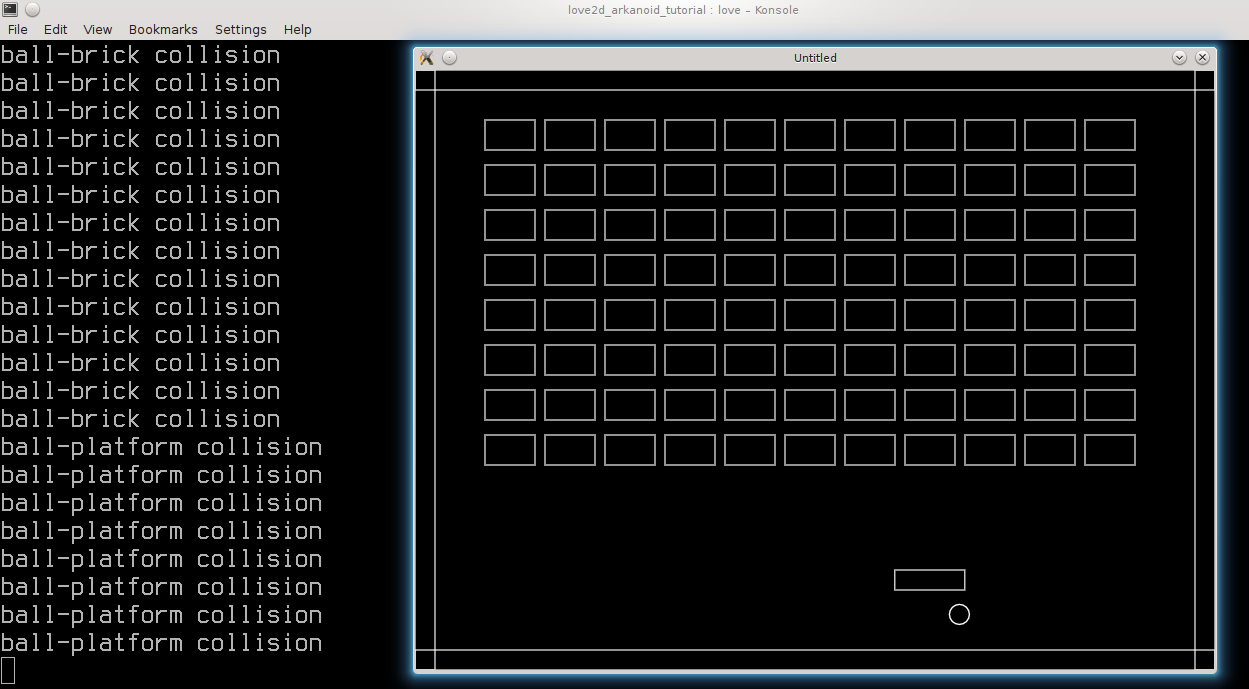
It is convenient to store all collision-related functions in a special table:
把所有碰撞相关的函数放到一个专门的表里会更方便:
local collisions = {}Collisions have to be detected each update cycle -- collisions.resolve_collisions function is added into love.update ( the function is called resolve_collisions, but currently it will be doing only detection ).
碰撞需要在每次更新时检测,所以我们把 collisions.resolve_collisions 加进 love.update(虽然名字叫 resolve,但目前它只做检测)。
function love.update( dt )
   .....
   collisions.resolve_collisions()
end
There are 4 types of collisions: ball-platform, ball-walls, ball-bricks and platform-walls. Each of them is checked separately:
共有 4 种碰撞:球-平台、球-墙、球-砖块、平台-墙。它们分别单独检测:
function collisions.resolve_collisions()
   collisions.ball_platform_collision( ball, platform )
   collisions.ball_walls_collision( ball, walls )
   collisions.ball_bricks_collision( ball, bricks )
   collisions.platform_walls_collision( platform, walls )
end
For simplicity, I'm going to approximate the ball by an axis-aligned square. It significantly simplifies collision detection and collision resolution and it turns out to be sufficient for the current prototype. After that, all 4 types of collisions can be treated as collisions of rectangles.
为了简化实现,我把球近似为一个与坐标轴对齐的正方形。这样会大幅简化碰撞检测和处理,而且对当前原型来说已经够用了。这样一来,这 4 类碰撞就都可以当成矩形之间的碰撞来处理。
It is convenient to have a helper function that detects an overlap of two rectangles. Suppose the rectangles - a and b - represented by tables with the fields x,y,width and height. We can detect an overlap with (see the second answer; add an explanation here)
我们需要一个辅助函数来检测两个矩形是否重叠。假设矩形 a 和 b 用包含 x、y、width、height 字段的表来表示。检测重叠可以用下面的方法(参考 第二个回答;这里还需要补个说明):
function collisions.check_rectangles_overlap( a, b )
   local overlap = false
   if not( a.x + a.width < b.x  or b.x + b.width < a.x  or
           a.y + a.height < b.y or b.y + b.height < a.y ) then
      overlap = true
   end
   return overlap
end
This function expects two tables with fields x,y,width and height. However, our game objects have different representation. To detect an overlap, it is necessary to prepare the a and b rectangles first. After that it is possible to use collisions.check_rectangles_overlap and in the case of overlap print a message in the console.
这个函数要求输入两个带 x、y、width、height 字段的表。但我们的游戏对象并不是这个结构。所以要先把对象转换成 a 和 b 这样的矩形,再调用 collisions.check_rectangles_overlap,如果有重叠就输出提示信息。
function collisions.ball_platform_collision( ball, platform )
   local a = { x = platform.position_x,                  --(*1)
               y = platform.position_y,
               width = platform.width,
               height = platform.height }
   local b = { x = ball.position_x - ball.radius,        --(*1)
               y = ball.position_y - ball.radius,
               width = 2 * ball.radius,
               height = 2 * ball.radius }
   if collisions.check_rectangles_overlap( a, b ) then   --(*2)
      print( "ball-platform collision" )                 --(*3)
   end
end
(*1): rectangles a and b are constructed from the properties of the game objects.
(*2): the overlap between a and b is checked.
(*3): if they overlap, a message to the console is printed.
(*1):由游戏对象的属性构建矩形 a 和 b。
(*2):检查 a 和 b 是否重叠。
(*3):如果重叠,就在控制台输出提示。
The ball-bricks, ball-walls, and platform-walls collisions are dealt with in a same fashion. The only difference is that it is necessary to iterate over all bricks and all walls. For example, for the ball-bricks case:
球-砖块、球-墙、平台-墙的碰撞处理方式是一样的。唯一的区别是需要遍历所有砖块或所有墙。以球-砖块为例:
function collisions.ball_bricks_collision( ball, bricks )
   local b = { x = ball.position_x - ball.radius,           --(*1)
               y = ball.position_y - ball.radius,
               width = 2 * ball.radius,
               height = 2 * ball.radius }
   for i, brick in pairs( bricks.current_level_bricks ) do  --(*2)
      local a = { x = brick.position_x,                     --(*3)
                  y = brick.position_y,
                  width = brick.width,
                  height = brick.height }
      if collisions.check_rectangles_overlap( a, b ) then   --(*4)
         print( "ball-brick collision" )
      end
   end
end
(*1): rectangle for the ball is constructed.
(*2): iteration over bricks starts.
(*3),(*4): for each brick, the rectangle is constructed and the overlap with the ball is checked
(*1):构建球对应的矩形。
(*2):开始遍历砖块。
(*3)、(*4):对每个砖块构建矩形,并检测与球是否重叠。
The last change for this part is unrelated to collisions: the love.keyreleased callback is added, so the game exits when Esc key is pressed (released, actually).
这一部分最后的改动与碰撞无关:我们添加 love.keyreleased 回调,使得按下(准确说是松开)Esc 键时退出游戏。
function love.keyreleased( key, code )
   if  key == 'escape' then
      love.event.quit()
   end
end