
27. Wall Tiles
In this part I want to add tiles for the walls.
本节要为墙体加入贴图。
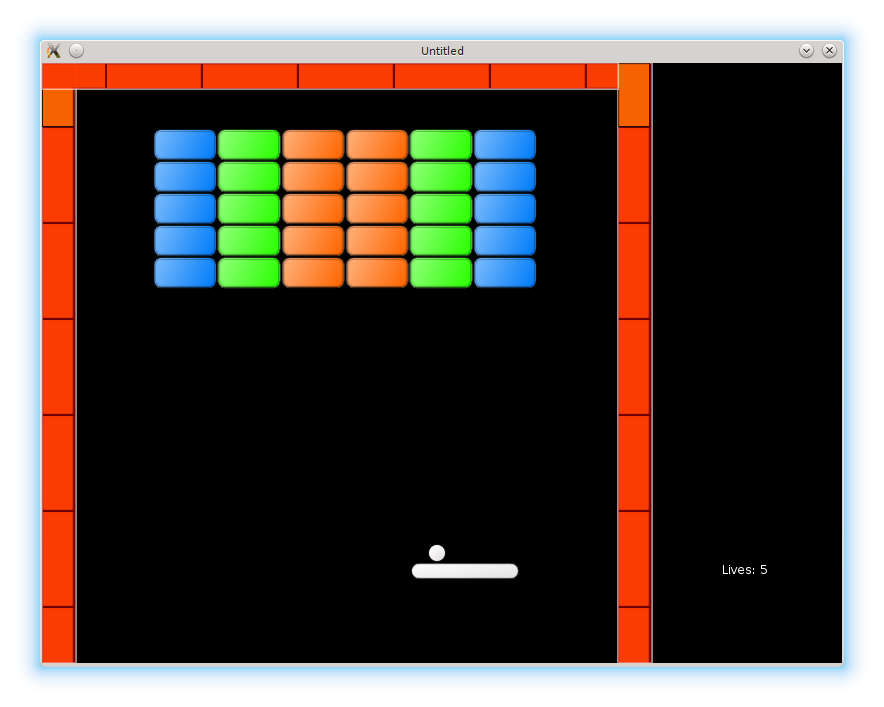
There are two vertical walls on the sides of the bricks area and one horizontal at the top. Instead of using images covering full length of the walls, I use short repeating segments. The segments for the vertical walls are slightly different in thickness from the one for the horizontal wall. Besides, two separate tiles for the corners are used.
砖块区域两侧有两面竖墙,上方有一面横墙。我没有使用覆盖整面墙的长图,而是使用短的重复段。竖墙的段厚度与横墙略有不同。另外,拐角处还需要两块单独的 corner tile。

Wall tiles: vertical, horizontal, top-left and top-right corners.
墙体 tiles:竖向、横向、左上角与右上角。
The tileset description and quads creation are placed in the walls.lua
tileset 的描述和 quad 的创建放在 walls.lua 中。
local image = love.graphics.newImage( "img/800x600/walls.png" )
local wall_vertical_tile_width = 32
local wall_vertical_tile_height = 96
local wall_vertical_tile_x_pos = 0
local wall_vertical_tile_y_pos = 0
local wall_horizontal_tile_width = 96
local wall_horizontal_tile_height = 26
local wall_horizontal_tile_x_pos = 64
local wall_horizontal_tile_y_pos = 0
local topleft_corner_tile_width = 64
local topleft_corner_tile_height = 64
local topleft_corner_tile_x_pos = 64
local topleft_corner_tile_y_pos = 32
local topright_corner_tile_width = 64
local topright_corner_tile_height = 64
local topright_corner_tile_x_pos = 128
local topright_corner_tile_y_pos = 32
local tileset_width = 192
local tileset_height = 96
local vertical_quad = love.graphics.newQuad(
   wall_vertical_tile_x_pos,
   wall_vertical_tile_y_pos,
   wall_vertical_tile_width,
   wall_vertical_tile_height,
   tileset_width, tileset_height )
local horizontal_quad = love.graphics.newQuad(
   wall_horizontal_tile_x_pos,
   wall_horizontal_tile_y_pos,
   wall_horizontal_tile_width,
   wall_horizontal_tile_height,
   tileset_width, tileset_height )
local topright_corner_quad = love.graphics.newQuad(
   topright_corner_tile_x_pos,
   topright_corner_tile_y_pos,
   topright_corner_tile_width,
   topright_corner_tile_height,
   tileset_width, tileset_height )
local topleft_corner_quad = love.graphics.newQuad(
   topleft_corner_tile_x_pos,
   topleft_corner_tile_y_pos,
   topleft_corner_tile_width,
   topleft_corner_tile_height,
   tileset_width, tileset_height )
Each wall is drawn a bit differently. The top one uses different quads and different number of segments than the right and left. Unlike the left, the right needs to change it's appearance when the "Next Level" bonus is active. It is possible to define separate drawing functions for each wall. Instead, I add an unique tag layout to each one, which I'll later use in the walls.draw_wall function to distinguish between them.
每面墙的绘制方式略有不同。顶部用的 quad 和重复次数与左右墙不一样。右墙在 “Next Level” 奖励激活时还需要改变外观。可以为每面墙分别写绘制函数,但我选择给每面墙加一个 layout 标签,在 walls.draw_wall 里用它来区分。
function walls.new_wall( position, width, height, layout )
   return( { position = position,
             width = width,
             height = height,
             layout = layout } )
end

function walls.construct_walls()
   local left_wall = walls.new_wall(
      vector( 0, 0 ),
      walls.side_walls_thickness,
      love.graphics.getHeight(),
      "left"
   )
   local right_wall = walls.new_wall(
      vector( walls.right_border_x_pos, 0 ),
      walls.side_walls_thickness,
      love.graphics.getHeight(),
      "right"
   )
   local top_wall = walls.new_wall(
      vector( 0, 0 ),
      walls.right_border_x_pos,
      walls.top_wall_thickness,
      "top"
   )
   walls.current_level_walls["left"] = left_wall
   walls.current_level_walls["right"] = right_wall
   walls.current_level_walls["top"] = top_wall
end
In the walls.draw_wall function check of the layout field is performed.
在 walls.draw_wall 中根据 layout 字段进行判断。
function walls.draw_wall( single_wall )
   if ( single_wall.layout == 'top' ) then
      .....
   elseif single_wall.layout == 'left' then
      .....
   elseif single_wall.layout == 'right' then
      .....
   end
end
The top wall is responsible for drawing corner tiles. After that, 4 horizontal segments are drawn.
顶部墙先绘制角落 tiles,然后再绘制 4 段横向重复。
function walls.draw_wall( single_wall )
   if ( single_wall.layout == 'top' ) then
      love.graphics.draw(
         image, topleft_corner_quad,
         single_wall.position.x, single_wall.position.y )
      love.graphics.draw(
         image, topright_corner_quad,
         single_wall.position.x + single_wall.width - topleft_corner_tile_width / 2,
         single_wall.position.y )
      local repeat_n_times = 4
      for i = 0, repeat_n_times do
         shift_x = topleft_corner_tile_width + i * wall_horizontal_tile_width
         love.graphics.draw(
            image, horizontal_quad,
            single_wall.position.x + shift_x, single_wall.position.y )
      end
   elseif .....
end
For the left wall, vertical segment is repeated several times. An y-displacement is necessary to accommodate for the corner tile height. The necessary number of segments is calculated dynamically.
对于左墙,需要重复绘制竖向段。由于有角落 tile 的高度,需要对 y 方向做偏移。重复次数动态计算。
function walls.draw_wall( single_wall )
   .....
   elseif single_wall.layout == 'left' then
      local repeat_n_times = math.floor(
         (single_wall.height - topright_corner_tile_height)
            / wall_vertical_tile_height )
      for i = 0, repeat_n_times do
         shift_y = topright_corner_tile_height + i * wall_vertical_tile_height
         love.graphics.draw( image,
                             vertical_quad,
                             single_wall.position.x,
                             single_wall.position.y + shift_y )
      end
   elseif .....
end
The drawing procedure for the right wall is mostly similar to the left. The only exception is a situation, when "Next Level" bonus is active. In that case, one of the tiles - last but one - is not drawn.
右墙的绘制和左墙大体相同。唯一例外是 “Next Level” 奖励激活时,此时倒数第二块 tile 不绘制。
function walls.draw_wall( single_wall )
   .....
   elseif single_wall.layout == 'right' then
      local repeat_n_times = math.floor(
         (single_wall.height - topright_corner_tile_height) /
            wall_vertical_tile_height )
      for i = 0, repeat_n_times do
         if not ( single_wall.next_level_bonus and i == repeat_n_times - 1 ) then
            shift_y = topright_corner_tile_height + i * wall_vertical_tile_height
            love.graphics.draw( image,
                                vertical_quad,
                                single_wall.position.x,
                                single_wall.position.y + shift_y )
         end
      end
   end
   .....
end