
10. Loading Levels From Files
While we are talking about splitting the code, I also want to move level definitions into separate files. This is not immediately necessary, but will become convenient later, when the amount of levels will grow.
既然我们在拆分代码,我也想把关卡定义移到独立文件里。现在不是必须,但当关卡数量变多时会更方便。
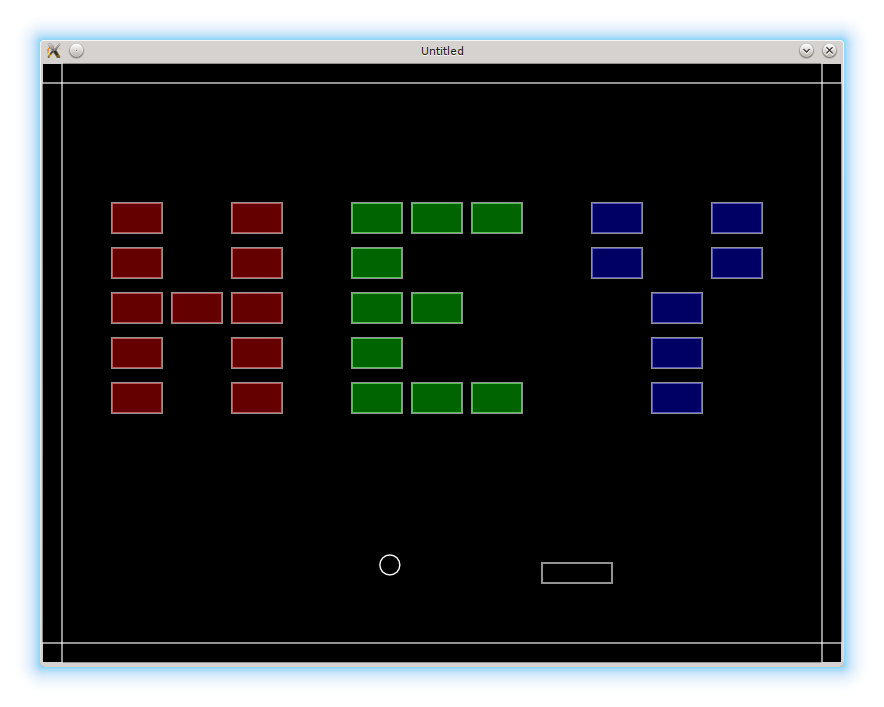
The files with the levels descriptions will be kept at the levels folder. It is possible to write each level-file as a separate Lua module. However, it is considered a good practice to avoid any code in level files, preferably making them data-only. Therefore, the only thing that remains from the Lua module structure is the return statement. Here is an example of hey.lua:
关卡描述文件会放在 levels 文件夹里。每个关卡文件可以写成独立的 Lua 模块。但更好的实践是尽量不要在关卡文件里写代码,让它只包含数据。因此,模块结构里唯一保留下来的就是 return 语句。下面是 hey.lua 的示例:
return {
   { 0, 0, 0, 0, 0, 0, 0, 0, 0, 0, 0 },
   { 0, 0, 0, 0, 0, 0, 0, 0, 0, 0, 0 },
   { 1, 0, 1, 0, 2, 2, 2, 0, 3, 0, 3 },
   { 1, 0, 1, 0, 2, 0, 0, 0, 3, 0, 3 },
   { 1, 1, 1, 0, 2, 2, 0, 0, 0, 3, 0 },
   { 1, 0, 1, 0, 2, 0, 0, 0, 0, 3, 0 },
   { 1, 0, 1, 0, 2, 2, 2, 0, 0, 3, 0 },
   { 0, 0, 0, 0, 0, 0, 0, 0, 0, 0, 0 }
}
Previously the order of the levels was maintained by the levels.sequence array. I also want to move it into a separate file sequence.lua. It is going to store an array of level filenames.
之前关卡顺序由 levels.sequence 数组维护。我也准备把它移到单独的 sequence.lua 文件里,用来保存关卡文件名的数组。
return {
   "hey",
   "bye"
}
The levels.sequence has to be required inside the levels module:
levels.sequence 需要在 levels 模块里 require 进来:
.....
levels.sequence = require "levels/sequence"
To load the contents of the current level file, a separate function is defined:
为了加载当前关卡文件的内容,需要定义一个单独的函数:
function levels.require_current_level()
   local level_filename = "levels/" .. levels.sequence[ levels.current_level ] --(*1)
   local level = require( level_filename )
   return level
end
(*1): current level filename is appended to the "levels/" folder.
(*1):当前关卡文件名会拼到 "levels/" 目录后面。
love.load and levels.switch_to_next_level( bricks, ball ) have to be update to use this function.
love.load 和 levels.switch_to_next_level( bricks, ball ) 需要更新,以使用这个函数。
function love.load()
   level = levels.require_current_level()
   bricks.construct_level( level )
   .....
end

function levels.switch_to_next_level( bricks, ball )
    .....
         levels.current_level = levels.current_level + 1
         level = levels.require_current_level()
         bricks.construct_level( level )
    .....
end
Apart from these modifications, there are a couple of other things I want to introduce in this part. First, to facilitate the bricks destruction process, I want to define a function bricks.clear_current_level_bricks(), that is going to clear all the remaining bricks on the level. It is going to be called when the c key is pressed.
除了这些修改,这一部分还有两件小事。首先,为了方便清空砖块,我要定义一个 bricks.clear_current_level_bricks() 函数,用来清除当前关卡里剩余的砖块。按下 c 键时会调用它。
function love.keyreleased( key, code )
   if key == 'c' then
      bricks.clear_current_level_bricks()
   .....
end

function bricks.clear_current_level_bricks()
   for i in pairs( bricks.current_level_bricks ) do
      bricks.current_level_bricks[i] = nil
   end
end
The main point, of course, is to automatically achieve the condition of switching to the next level.
当然,最终目的还是为了方便触发“切换到下一关”的条件。
The second thing is bricks coloring, depending on the brick's type. To implement this, in bricks.draw_brick it is necessary to set the value of the fill color using this property. Bricks of type 1 will be in red, 2 - green, and 3 - blue.
第二件事是根据砖块类型来上色。要实现这个效果,需要在 bricks.draw_brick 里根据 bricktype 设置填充颜色。类型 1 用红色,类型 2 用绿色,类型 3 用蓝色。
function bricks.draw_brick( single_brick )
   love.graphics.rectangle( 'line',
                            single_brick.position.x,
                            single_brick.position.y,
                            single_brick.width,
                            single_brick.height )
   local r, g, b, a = love.graphics.getColor( )
   if single_brick.bricktype == 1 then                 --(*1)
      love.graphics.setColor( 255, 0, 0, 100 )
   elseif single_brick.bricktype == 2 then
      love.graphics.setColor( 0, 255, 0, 100 )
   elseif single_brick.bricktype == 3 then
      love.graphics.setColor( 0, 0, 255, 100 )
   end
   love.graphics.rectangle( 'fill',                    --(*2)
                            single_brick.position.x,
                            single_brick.position.y,
                            single_brick.width,
                            single_brick.height )
   love.graphics.setColor( r, g, b, a )                --(*3)
end
(*1): choose drawing color for the brick.
(*2): add fill representation.
(*3): restore the default colorscheme.
(*1):选择砖块的绘制颜色。
(*2):绘制填充效果。
(*3):恢复默认配色。