
09. Splitting Code Into Several Files
In this part I'm finally going to split the main.lua into several smaller files.
这一部分我们终于要把 main.lua 拆分成多个更小的文件。
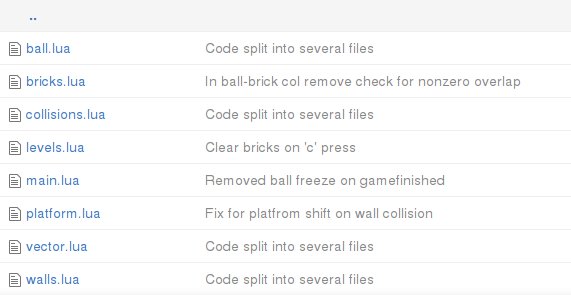
In Lua, a main program can load external files using require function. When a file is required, the code inside it is executed. By default, the execution takes place in the global environment of the main program. Thus, every variable that is not declared local, will be visible in the main program. The local variables are accessible only from the file, and do not pollute the global environment. If the external file has a return statement, that would be the result of the require statement in the main program.
在 Lua 中,主程序可以用 require 来加载外部文件。被 require 的文件会被执行。默认情况下,它会在主程序的全局环境中运行,因此任何没有声明为 local 的变量都会暴露到主程序中。local 变量只在该文件内可见,不会污染全局环境。如果外部文件有 return 语句,那么它的返回值就是主程序里 require 的返回值。
Typically, inside the external file a temporary table is created; all the definitions, that are going to be exported into the main program, are added into that table. Then, the table is returned into the main program. Auxiliary functions and variable are declared local and are not added into it.
通常情况下,会在外部文件里创建一个临时表,把需要导出的定义都放进去,然后把这个表 return 回主程序。辅助函数和变量则声明为 local,不放进这个表里。
For demonstration, suppose there is a greetings.lua file with the following content:
举个例子,假设有一个 greetings.lua 文件,内容如下:
local greetings = {}  --(*1)

greetings.hello_message = "Hello from Greetings module."

function greetings.say_hello()
  print( greetings.hello_message )
end

local secret = "IDDQD"

function greetings.reveal_secret()
  print( secret )
end

function make_mess()
   mess = "terrible"
end

return greetings --(*2)
(*1): declaration of the greetings table, where all the module definitions will be added. Typically such table is declared local.
(*2): this table is returned at the end of the module.
(*1):声明 greetings 表,用来存放模块要导出的所有定义。通常这个表会声明为 local。
(*2):在模块末尾把这个表 return 出去。
It is possible to load and test this module from the Lua interpreter:
可以在 Lua 解释器里加载并测试这个模块:
> greet = require "greetings"   --(*1)
> greet.hello_message           --(*2)
Hello from Greetings module.
> greet.say_hello()             --(*2)
Hello from Greetings module.
> greet.secret                  --(*3)
nil
> greet.reveal_secret()         --(*3)
IDDQD
> mess                          --(*5)
nil
> greet.make_mess()             --(*4)
stdin:1: attempt to call a nil value (field 'make_mess')
stack traceback:
        stdin:1: in main chunk
        [C]: in ?
> make_mess()                   --(*4)
> greet.mess                    --(*5)
nil
> mess                          --(*5)
terrible
(*1): "greetings" is required. The .lua extension is omitted. The returned table is assigned to the greet variable. For interpreter to be able to find the "greetings.lua", it has to be launched from the same folder where the file is stored.
(*2): both hello_message and say_hello are accessible from the greet table.
(*3): secret is declared local and can't be accessed from the interpreter. However, greet.reveal_secret function has access to this variable.
(*4): the make_mess definition is not prefixed neither with local nor with module table. This function becomes defined in the global namespace.
(*5): mess variable is initially empty in the global namespace. After the call to the make_mess function, the mess variable becomes defined in the global scope, not in the greet table.
(*1):require 了 "greetings",省略了 .lua 扩展名。返回的表赋给变量 greet。解释器要能找到 "greetings.lua",需要从该文件所在目录启动。
(*2):hello_message 和 say_hello 都可以通过 greet 表访问。
(*3):secret 是 local,解释器里无法直接访问,但 greet.reveal_secret 可以访问它。
(*4):make_mess 既没有加 local,也没有挂到模块表上,因此它会被定义到全局命名空间。
(*5):mess 变量在全局命名空间里最初是空的。调用 make_mess 后,mess 变成全局变量,而不是 greet 表里的字段。
It can be seen, that with such a simple approach to module creation, it is necessary to be careful not to accidentally put a variable or function declaration in the global scope. Every declaration should be either local or go into greetings table. A workaround can be provided by environment manipulations. I plan to address this issue in the Appendix.
可以看到,这种简单的模块写法要求我们小心,避免不小心把变量或函数定义到全局作用域里。每个定义要么是 local,要么放进 greetings 表。可以通过环境(environment)的操作来规避这个问题,我会在附录里讲。
Regarding the game code, following this scheme, it is necessary to move each table in a separate file and add a return statement returning this table.
对应到游戏代码,按这个方案需要把每个表拆到单独文件里,并在末尾 return 这个表。
local levels = {}
levels.current_level = 1
levels.gamefinished = false
levels.sequence = {}
.....
return levels
After that, in the main.lua it is necessary to require these files:
然后在 main.lua 里 require 这些文件:
local ball = require "ball"
local platform = require "platform"
local bricks = require "bricks"
local walls = require "walls"
local collisions = require "collisions"
local levels = require "levels"

.....
Apart from that, the rest of the code in the main.lua and modules doesn't change.
除此之外,main.lua 和各模块里的其它代码都不需要改。
The only thing I want to introduce in this chapter is vector module from HUMP library. It defines a class for a 2d-vector, which can be used to simplify arithmetical manipulations on coordinates.
本章唯一还要引入的新东西是 HUMP 库里的 vector 模块。它定义了一个二维向量类,可以用来简化坐标相关的运算。
local vector = require "vector"

local ball = {}
ball.position = vector( 200, 500 ) --(*1)
ball.speed = vector( 700, 700 )
ball.radius = 10

function ball.update( dt )
   ball.position = ball.position + ball.speed * dt  --(*2)
end

function ball.draw()
   local segments_in_circle = 16
   love.graphics.circle( 'line',
			 ball.position.x,      --(*3)
			 ball.position.y,
			 ball.radius,
			 segments_in_circle )
end
(*1): Instead of ball.position_x and ball.position_y there is now a single 2d vector ball.position, holding x and y components inside. Same for the ball.speed.
(*2): HUMP.vector defines several operations on vectors, such as addition. This allows to simplify the code.
(*3): Individual components of the vector can be accessed using table indexing notation.
(*1):用一个二维向量 ball.position 取代 ball.position_x 和 ball.position_y,其中包含 x 和 y 分量;ball.speed 也是同样。
(*2):HUMP.vector 为向量定义了加法等操作,能让代码更简洁。
(*3):向量的分量可以用表索引的方式访问。