
12. Advanced Gamestates
As the number of game objects increases, it becomes cumbersome to use if-else to maintain gamestates. It is more convenient to put each gamestate into a separate file. In this part I want to introduce such a more sophisticated gamestates system.
随着游戏对象数量增加,用 if-else 来维护 gamestate 会越来越笨重。把每个 gamestate 放到独立文件里更方便。本节要介绍一套更完善的 gamestate 系统。
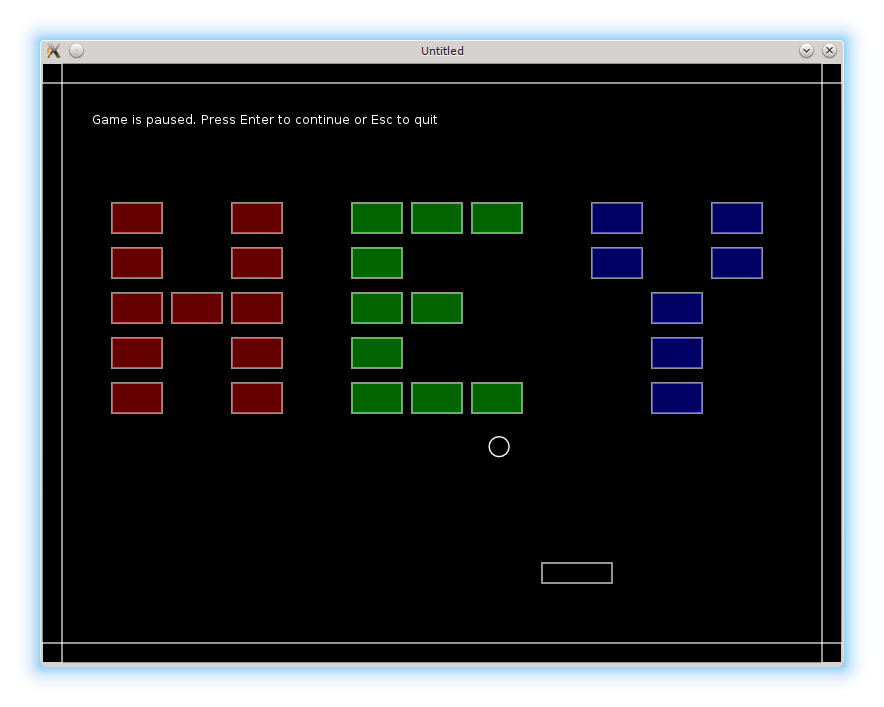
The scheme is following: each gamestate is represented by a table, containing it's own draw, update and other LÖVE callbacks, as well as all the necessary game objects. Reference to this table is stored in a special variable in the main program. Each LÖVE callback is redirected to an appropriate gamestate callback. Transition between the gamestates is achieved by changing the variable to point to another gamestate table.
整体思路如下:每个 gamestate 用一个表来表示,里面包含自己的 draw、update 等 LÖVE 回调,以及所需的游戏对象。在主程序里用一个专门变量保存对该表的引用。主程序中的每个 LÖVE 回调都会被转发到当前 gamestate 的回调中。切换状态就是让这个变量指向另一个 gamestate 表。
Let's start from the gamestates module. It defines a variable current_state that points to the currently active gamestate, and two functions: set_state and state_event - responsible for switching gamestates and redirecting callbacks.
先从 gamestates 模块开始。它定义了一个 current_state 变量,指向当前激活的 gamestate,并提供两个函数:set_state 和 state_event,负责切换状态与转发回调。
The definition of the state_event is:
state_event 的定义如下:
local gamestates = {}

local current_state = nil                                            --(*1)

function gamestates.state_event( function_name, ... )
   if current_state and type( current_state[function_name] ) == 'function' then
      current_state[function_name](...)                              --(*2)
   end
end
(*1): current_state points to the currently active gamestate.
(*2): If function with function_name is present in the gamestate, this function is called. Ellipsis ... is used to forward arguments of the state_event to the current_state[function_name]. In Lua, ... is called a vararg expression. In the argument list of a function, it indicates, that the function accepts arbitrary number of arguments. In the body of the function, ... acts like a multivalued function, returning all the collected arguments.
(*1):current_state 指向当前激活的 gamestate。
(*2):如果当前 gamestate 里有名为 function_name 的函数,就调用它。... 用于把 state_event 的参数原样转发给 current_state[function_name]。在 Lua 中,... 称为可变参数表达式:在函数参数列表中表示可接收任意数量的参数;在函数体中,它会返回所有收集到的参数。
The set_state function expects a state name as a string. It requires the corresponding gamestate module. To prevent multiple requirement of the same modules, they are cached in the loaded table.
set_state 接收一个字符串形式的状态名,并 require 对应的 gamestate 模块。为了避免重复加载同一个模块,它们会被缓存到 loaded 表里。
local loaded = {}                                                    --(*1)

function gamestates.set_state( state_name, ... )
   gamestates.state_event( 'exit' )                                  --(*2)
   local old_state_name = get_key_for_value( loaded, current_state ) --(*3)
   current_state = loaded[ state_name ]                              --(*4)
   if not current_state then
      current_state = require( state_name )                          --(*5)
      loaded[ state_name ] = current_state
      gamestates.state_event( 'load', old_state_name, ... )
   end
   gamestates.state_event( 'enter', old_state_name, ... )            --(*6)
end

return gamestates
(*1): The already required gamestates are stored in the loaded table with gamestate names used as keys.
(*2): When gamestates change, "exit" callback of the current state is called (if it is defined).
(*3): get_key_for_value traverses loaded table and extracts the name under which the current_state is stored in that table.
(*4): If the new state has been loaded already, current_state will point to that state.
(*5): If the new state hasn't been loaded already, it is required and cached in the loaded table. After that, 'load' callback of that state is called.
(*6): After that, "enter" callback is called. Both "load" and "enter" receive old gamestate as an argument (this is not used now, but it will turn convenient later).
(*1):已经加载过的 gamestate 会存进 loaded 表,键是 gamestate 名称。
(*2):切换状态时,会调用当前状态的 “exit” 回调(如果定义了)。
(*3):get_key_for_value 遍历 loaded 表,找出当前 current_state 对应的键名。
(*4):如果新状态已加载,current_state 直接指向它。
(*5):如果新状态还没加载,就 require 并缓存进 loaded 表,然后调用该状态的 “load” 回调。
(*6):之后调用 “enter” 回调。“load” 和 “enter” 都会接收旧状态作为参数(目前没用到,但以后会方便)。
In the main.lua LÖVE callbacks are redirected to gamestates.state_event according to the following definitions:
在 main.lua 中,LÖVE 回调按如下方式转发到 gamestates.state_event:
function love.update( dt )
   gamestates.state_event( "update", dt )
end

function love.draw()
   gamestates.state_event( "draw" )
end

function love.keyreleased( key, code )
   gamestates.state_event( "keyreleased", key, code )
end
After that, each gamestate can be moved into a separate file. For example, the menu.lua for the "menu" state is:
然后就可以把每个 gamestate 移到单独文件中。例如,"menu" 状态对应的 menu.lua:
local menu = {}

function menu.update( dt )
end

function menu.draw()
   love.graphics.print("Menu gamestate. Press Enter to continue.",
                       280, 250)
end

function menu.keyreleased( key, code )
   if key == "return" then
      gamestates.set_state( "game", { current_level = 1 } )
   elseif key == 'escape' then
      love.event.quit()
   end
end

return menu
The usefulness of such an approach can be seen most clearly for the "game" gamestate: all the game objects are now local to this state.
这种做法在 “game” 状态里最能体现优势:所有游戏对象都变成了该状态的局部变量。
local ball = require "ball"
local platform = require "platform"
local bricks = require "bricks"
local walls = require "walls"
local collisions = require "collisions"
local levels = require "levels"

local game = {}

.....

function game.update( dt )
   ball.update( dt )
   platform.update( dt )
   bricks.update( dt )
   walls.update( dt )
   collisions.resolve_collisions( ball, platform, walls, bricks )
   game.switch_to_next_level( bricks, ball, levels )
end

function game.draw()
   ball.draw()
   platform.draw()
   bricks.draw()
   walls.draw()
end

.....

return game
There are several minor subtleties that need an attention to make this scheme work.
要让这套方案顺利工作,还需要注意一些小细节。
The first one regards the requiring of the "gamestates" module. The functions of this module have to be accessible from each of the gamestates. This can be achieved by placing local gamestates = require "gamestates" in each of the menu.lua, game.lua, etc. However, that would result in circular dependencies. To avoid that, I explicitly load this module only from the main.lua and store it in a global variable.
第一点是关于 gamestates 模块的 require。各个状态都需要访问这个模块的函数。理论上可以在 menu.lua、game.lua 等文件里都写 local gamestates = require "gamestates",但这会导致循环依赖。为避免这一点,我只在 main.lua 中显式加载它,并把它放到全局变量里。
gamestates = require "gamestates"Second. In the "gamepaused" state I want to display the ball, the platform, the bricks and the walls as the background. However, these objects are now local to the "game", and are not available in the "gamepaused". The solution is to pass them as arguments in the set_state call.
第二点。在 “gamepaused” 状态下,我希望把球、平台、砖块和墙画出来作为背景,但这些对象现在是 “game” 状态的局部变量,在 “gamepaused” 里拿不到。解决办法是在 set_state 调用时把它们作为参数传过去。
function game.keyreleased( key, code )
   .....
   elseif  key == 'escape' then
      gamestates.set_state( "gamepaused", { ball, platform, bricks, walls } )
   end
end
On entering the "gamepaused", it is necessary to store the received game objects somewhere. I use local game_objects variable, available to the whole module.
进入 “gamepaused” 后,需要把传来的游戏对象存起来。我用一个模块级的 local game_objects 变量来保存。
local game_objects = {}

function gamepaused.enter( prev_state, ... )
   game_objects = ...
end
After that, in the draw callback it is possible to iterate over the contents of the game_objects table. If any of it's members happens to have draw method, this method is called.
之后在 draw 回调里遍历 game_objects 表,如果某个成员有 draw 方法就调用它。
function gamepaused.draw()
   for _, obj in pairs( game_objects ) do
      if type(obj) == "table" and obj.draw then
         obj.draw()
      end
   end
   love.graphics.print(
      "Game is paused. Press Enter to continue or Esc to quit",
      50, 50 )
end
Finally, upon exiting the "gamepaused" it is necessary to delete the references to the used game objects.
最后,退出 “gamepaused” 时需要清掉这些对象的引用。
function gamepaused.exit()
   game_objects = nil
end`
Third. The "game" gamestate can be entered from the "menu", "gamefinished" and "gamepaused" states. When it is entered for the first time, it is convenient to construct the walls, because they do not change during the game.
第三点。“game” 状态可以从 “menu”、“gamefinished” 和 “gamepaused” 进入。第一次进入时,最好先构建墙体,因为它们在游戏中不会变化。
function game.load( prev_state, ... )
   walls.construct_walls()
end
When "game" is entered from the "menu" or from the "gamefinished", it should start from the first level. When it is resumed from the "gamepaused", it should continue from the point where it has stopped. It is convenient to pass the level number into game.enter as an optional argument. If it is present, corresponding level is loaded. If it is missing, it is assumed that all objects are already in place and it is safe to continue:
当从 “menu” 或 “gamefinished” 进入 “game” 时,应该从第一关开始;从 “gamepaused” 恢复时,则应该从暂停处继续。可以把关卡号作为可选参数传给 game.enter。如果有该参数,就加载对应关卡;如果没有,则默认所有对象已就位,可以直接继续:
function game.enter( prev_state, ... )
   args = ...
   if args and args.current_level then
      levels.current_level = args.current_level
      local level = levels.require_current_level()
      bricks.construct_level( level )
      ball.reposition()
   end
end
Using such an approach, transitions from the "menu" and "gamefinished" are
按这种方式,从 “menu” 和 “gamefinished” 进入 “game” 的写法如下:
function menu.keyreleased( key, code )
   if key == "return" then
      gamestates.set_state( "game", { current_level = 1 } )
   .....
   end
end

function gamefinished.keyreleased( key, code )
   if key == "return" then
      gamestates.set_state( "game", { current_level = 1 } )
   .....
   end
end
It is also convenient to use gamestates.set_state to switch between the levels: the next level is passed to this function as an optional argument.
同样,也可以用 gamestates.set_state 来切换关卡:把下一关的关卡号作为可选参数传进去。
function game.switch_to_next_level( bricks, ball, levels )
   if bricks.no_more_bricks then
      if levels.current_level < #levels.sequence then
         gamestates.set_state( "game", { current_level = levels.current_level + 1 } )
      else
         gamestates.set_state( "gamefinished" )
      end
   end
end