
26. Menu Buttons
In this part I want to implement a simple main menu screen.
本节要实现一个简单的主菜单界面。
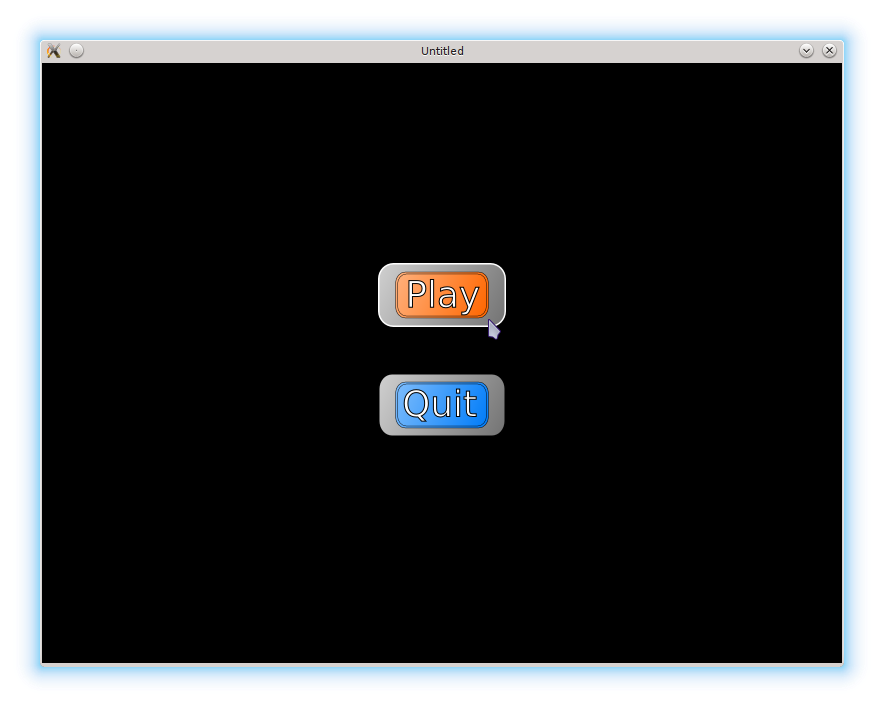
The menu I use consists of just two buttons: "Play" and "Quit". Each button is rectangular, with it's own image (in fact, different quads of the same image). A button has a selected flag, which is activated if a mouse pointer hovers over it. If a button is selected, it's image changes.
我使用的菜单只有两个按钮:“Play” 和 “Quit”。每个按钮都是矩形,并有自己的图片(实际上是同一张图的不同 quad)。按钮有一个 selected 标志,当鼠标悬停其上时会被激活;一旦 selected 为真,按钮的图片就会变化。
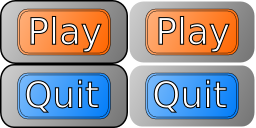
In the left column outline of the buttons is black, in the right - white. White outline version is used when the mouse cursor hovers over a button.
左列按钮是黑色描边,右列是白色描边。 白色描边的版本用于鼠标悬停时。
As a rectangle, a button needs position, width, and height. To display a texture, it needs an image and a quad. A different quad is used if the selected flag is active. If no image or quad is provided, a text is displayed instead. According to this description, a button constructor has the following form.
作为矩形,按钮需要位置、宽度和高度。要显示纹理,需要图片和 quad;当 selected 为真时使用另一张 quad。如果没有提供图片或 quad,则显示文本。根据这些需求,按钮构造函数可以这样写:
function buttons.new_button( o )
   return( { position = o.position or vector( 300, 300 ),
             width = o.width or 100,
             height = o.height or 50,
             text = o.text or "hello",
             image = o.image or nil,
             quad = o.quad or nil,
             quad_when_selected = o.quad_when_selected or nil,
             selected = false } )
end
In the update function mouse cursor position is monitored continuously. If the cursor is inside the button's rectangle, the selected flag is activated.
在 update 里持续监控鼠标位置。如果鼠标位于按钮矩形内,就设置 selected 为 true。
function buttons.update_button( single_button, dt )
   local mouse_pos = vector( love.mouse.getPosition() )
   if( buttons.inside( single_button, mouse_pos ) ) then
      single_button.selected = true
   else
      single_button.selected = false
   end
end

function buttons.inside( single_button, pos )
   return
      single_button.position.x < pos.x and
      pos.x < ( single_button.position.x + single_button.width ) and
      single_button.position.y < pos.y and
      pos.y < ( single_button.position.y + single_button.height )
end
The draw function displays the specified quad of the image. If the image or quad are invalid, a rectangle is drawn with LÖVE primitives and default text is displayed. The quad and the color of the rectangle and the text depend on the value of the selected flag.
draw 会绘制指定的 quad。如果图片或 quad 无效,就用 LÖVE 的绘图原语画一个矩形,并显示默认文本。quad 以及矩形/文本的颜色会根据 selected 的值变化。
function buttons.draw_button( single_button )
   if single_button.selected then
      if single_button.image and single_button.quad_when_selected then
         love.graphics.draw( single_button.image,
                             single_button.quad_when_selected,
                             single_button.position.x,
                             single_button.position.y )
      else
         love.graphics.rectangle( 'line',
                                  single_button.position.x,
                                  single_button.position.y,
                                  single_button.width,
                                  single_button.height )
         local r, g, b, a = love.graphics.getColor()
         love.graphics.setColor( 255, 0, 0, 100 )
         love.graphics.print( single_button.text,
                              single_button.position.x,
                              single_button.position.y )
         love.graphics.setColor( r, g, b, a )
      end
   else
      if single_button.image and single_button.quad then
         love.graphics.draw( single_button.image,
                             single_button.quad,
                             single_button.position.x,
                             single_button.position.y )
      else
         love.graphics.rectangle( 'line',
                                  single_button.position.x,
                                  single_button.position.y,
                                  single_button.width,
                                  single_button.height )
         love.graphics.print( single_button.text,
                              single_button.position.x,
                              single_button.position.y )
      end
   end
end
Unlike the ball, the platform and other game objects, buttons can be used from different game states and with different tile images. For this reason, a description of the menu button tileset is placed in the menu.lua where the buttons are created and not in the buttons.lua.
与球、平台等对象不同,按钮可能会在不同的 game state 中使用,并且可能使用不同的图块图片。因此菜单按钮的 tileset 描述放在 menu.lua 中(按钮创建的地方),而不是 buttons.lua。
local buttons = require "buttons"

local menu_buttons_image = love.graphics.newImage( "img/800x600/buttons.png" )
local button_tile_width = 128
local button_tile_height = 64
local play_button_tile_x_pos = 0
local play_button_tile_y_pos = 0
local quit_button_tile_x_pos = 0
local quit_button_tile_y_pos = 64
local selected_x_shift = 128
local tileset_width = 256
local tileset_height = 128
local play_button_quad = love.graphics.newQuad(
   play_button_tile_x_pos,
   play_button_tile_y_pos,
   button_tile_width,
   button_tile_height,
   tileset_width,
   tileset_height )
local play_button_selected_quad = love.graphics.newQuad(
   play_button_tile_x_pos + selected_x_shift,
   play_button_tile_y_pos,
   button_tile_width,
   button_tile_height,
   tileset_width,
   tileset_height )
local quit_button_quad = love.graphics.newQuad(
   quit_button_tile_x_pos,
   quit_button_tile_y_pos,
   button_tile_width,
   button_tile_height,
   tileset_width,
   tileset_height )
local quit_button_selected_quad = love.graphics.newQuad(
   quit_button_tile_x_pos + selected_x_shift,
   quit_button_tile_y_pos,
   button_tile_width,
   button_tile_height,
   tileset_width,
   tileset_height )
"Play" and "Quit" buttons are created in the menu.load. They are declared local in the scope of the menu.lua. This is necessary to provide access to these variables from other menu functions, such as menu.update and menu.draw.
“Play” 和 “Quit” 按钮在 menu.load 中创建,并在 menu.lua 的作用域里声明为 local。这样其它 menu 函数(如 menu.update、menu.draw)才能访问它们。
local start_button = {}
local quit_button = {}

function menu.load( prev_state, ... )
   start_button = buttons.new_button{
      text = "New game",
      position = vector( (800 - button_tile_width) / 2, 200),
      width = button_tile_width,
      height = button_tile_height,
      image = menu_buttons_image,
      quad = play_button_quad,
      quad_when_selected = play_button_selected_quad
   }
   quit_button = buttons.new_button{
      text = "Quit",
      position = vector( (800 - button_tile_width) / 2, 310),
      width = button_tile_width,
      height = button_tile_height,
      image = menu_buttons_image,
      quad = quit_button_quad,
      quad_when_selected = quit_button_selected_quad
   }
   music:play()
end
Buttons are drawn and updated in the appropriate menu callbacks.
按钮在 menu 的对应回调中更新和绘制。
function menu.update( dt )
   buttons.update_button( start_button, dt )
   buttons.update_button( quit_button, dt )
end

function menu.draw()
   buttons.draw_button( start_button )
   buttons.draw_button( quit_button )
end
If "Play" button is clicked, it is necessary to activate the "game" gamestate; in case of "Quit", love.event.quit should be called. To check, whether the click was made inside the button or outside, it is enough to return the value of the selected flag, since it is active only when the mouse hovers over the button (buttons.mousereleased function). I do not associate any on_click-functions with buttons. Instead, I check each button directly and perform corresponding actions.
如果点击 “Play”,就切换到 “game” 状态;点击 “Quit” 则调用 love.event.quit。要判断点击是否在按钮内部,只需看 selected 标志,因为它只有在鼠标悬停按钮时才为真(buttons.mousereleased 会返回该值)。我没有给按钮绑定 on_click,而是直接检查每个按钮并执行对应操作。
function menu.mousereleased( x, y, button, istouch )
   if button == 'l' or button == 1 then
      if buttons.mousereleased( start_button, x, y, button ) then
         gamestates.set_state( "game", { current_level = 1 } )
      elseif buttons.mousereleased( quit_button, x, y, button ) then
         love.event.quit()
      end
   elseif button == 'r' or button == 2 then
      love.event.quit()
   end
end

function buttons.mousereleased( single_button, x, y, button )
   return single_button.selected
end